
We’ve all had days when the browser feels less like a workspace and more like another thing to manage. Open tabs become digital sticky notes for things you don’t want to forget — until you’re left with dozens of tiny icons and no idea what half of them mean.
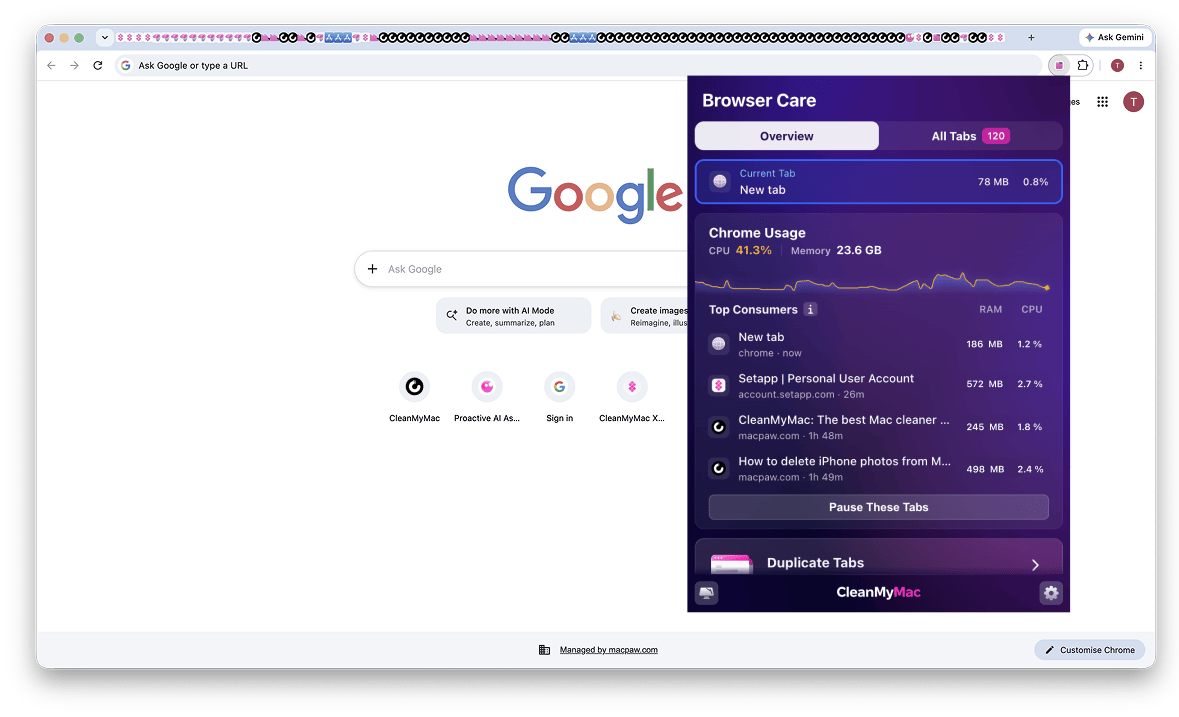
Say hello to Browser Care, a new Chrome extension for anyone with a hundred open tabs. It helps you reclaim two things a crowded browser can take away: your focus and your Mac’s performance.
Keep heavy tabs from slowing you down
Chrome may use a large share of your Mac’s resources, but it doesn’t make the responsible tabs easy to spot. Browser Care brings the most resource-heavy tabs into one view, so you can reduce the load without losing the pages that matter.
- Track high-memory tabs in real time
- Pause demanding tabs to reduce their resource use
- Clear duplicate and old tabs individually or in bulk
Turn tab chaos into a workspace you can navigate
Once tab titles shrink into tiny icons and pages spread across windows, the standard tab bar stops being much help. Browser Care replaces the hunt with one clear vertical view.
- View tabs from every Chrome window in one place
- Search for the tab you need instead of scanning tiny icons
- Sort tabs by resource use, time open, domain, or window
Browser Care is available as part of an active CleanMyMac plan — and included with a free 7-day CleanMyMac trial, alongside other tools for cleaning and optimizing your Mac.
Give it a try — and enjoy a browser that feels like a productive space again.