The latest version of macOS, macOS 27 Golden Gate, promises some big improvements to Apple Intelligence on Mac, including the long-awaited upgrade to Siri, as well as refinements to the Liquid Glass interface introduced in macOS Tahoe, and better security and safety features. It’s also the first version of macOS to be Apple silicon-only. Let’s take a look at what’s new, which Macs it will run on, and how you can make the most of the new OS.
Before you download macOS Golden Gate
Before you update your Mac to macOS Golden Gate, it’s a good idea to give it a cleanup first. That will remove junk files, update apps, check for malware, and suggest ways to boost performance. By doing that, you make sure that you are installing Golden Gate on a solid foundation so that it will run smoothly and speedily. The best and easiest way to clean up your Mac is to use CleanMyMac’s Smart Care feature.
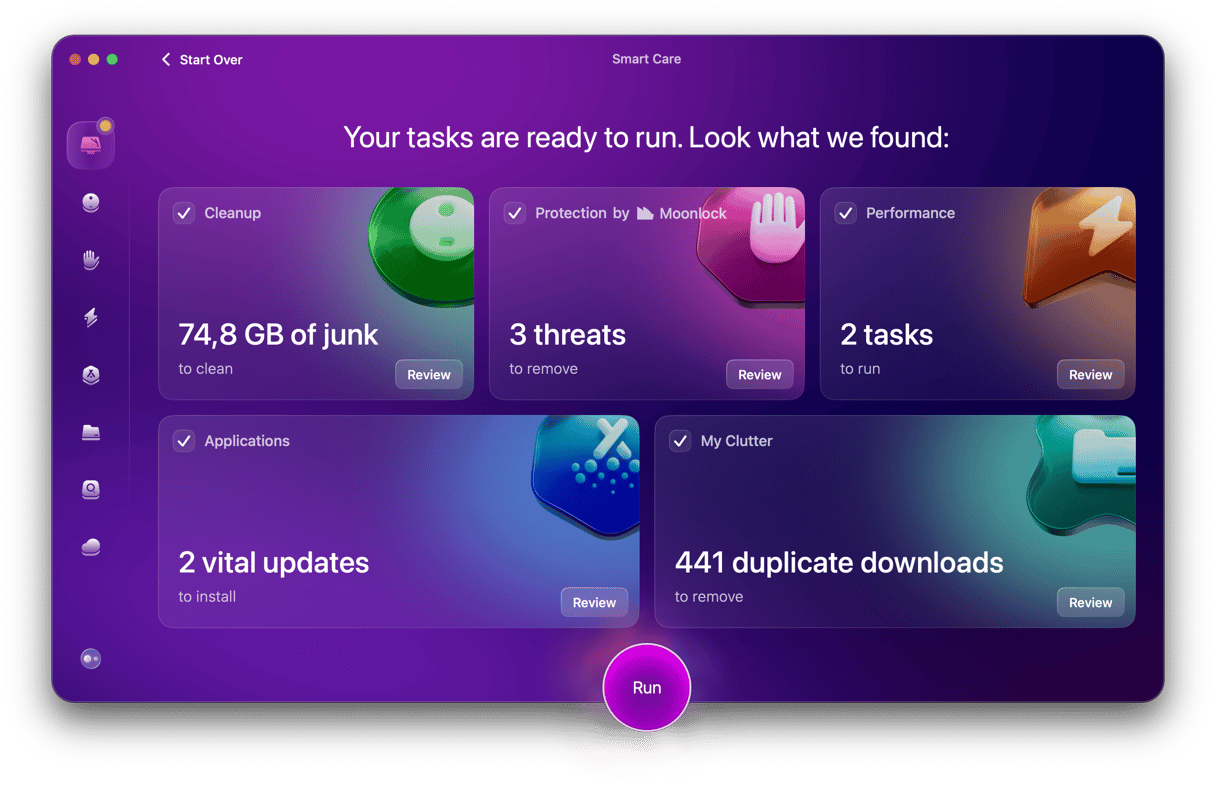
With one click, it scans your Mac looking for junk and clutter, updates for your applications, security threats, and performance opportunities. You can then choose to follow all of its recommendations or only some of them. You can test CleanMyMac for 7 days — get your free trial here.
Quick facts
- Name: macOS Golden Gate (macOS 27)
- Announced: WWDC 2026, 8 June 2026
- Release date: September 14, 2026
- Price: Free upgrade for compatible Macs
- Biggest change: Apple silicon only — Intel-based Macs no longer supported
When will macOS Golden Gate be available?
macOS Golden Gate is already available for an upgrade via System Settings. As usual, the upgrade is free.
However, as with the original Apple Intelligence, Siri AI will have its own release schedule starting ‘later this year’ with a beta version for users whose Mac is set to use English as its default language. You can learn more here.
What are the new features in Golden Gate?
Siri AI
The biggest news in Golden Gate is Siri AI. It will be integrated with Spotlight, so that when you press the Command-Space Spotlight shortcut, you can choose to have Siri AI results at the top when you type a query. There’s also a standalone Siri AI app, which has similar features like the ChatGPT and Claude apps. You can hold conversations with Siri AI, asking it about the content and context of data in your apps and files as well as the broader world. However you access it, you can ask Siri AI to take action in apps, like creating a Reminder, Note, or email, or resuming a podcast. It understands context, so you can ask it to perform actions on a photo in the Photos app, for example. Visual Intelligence allows you to take a screenshot of what’s on your Mac’s screen and ask Siri AI about it.
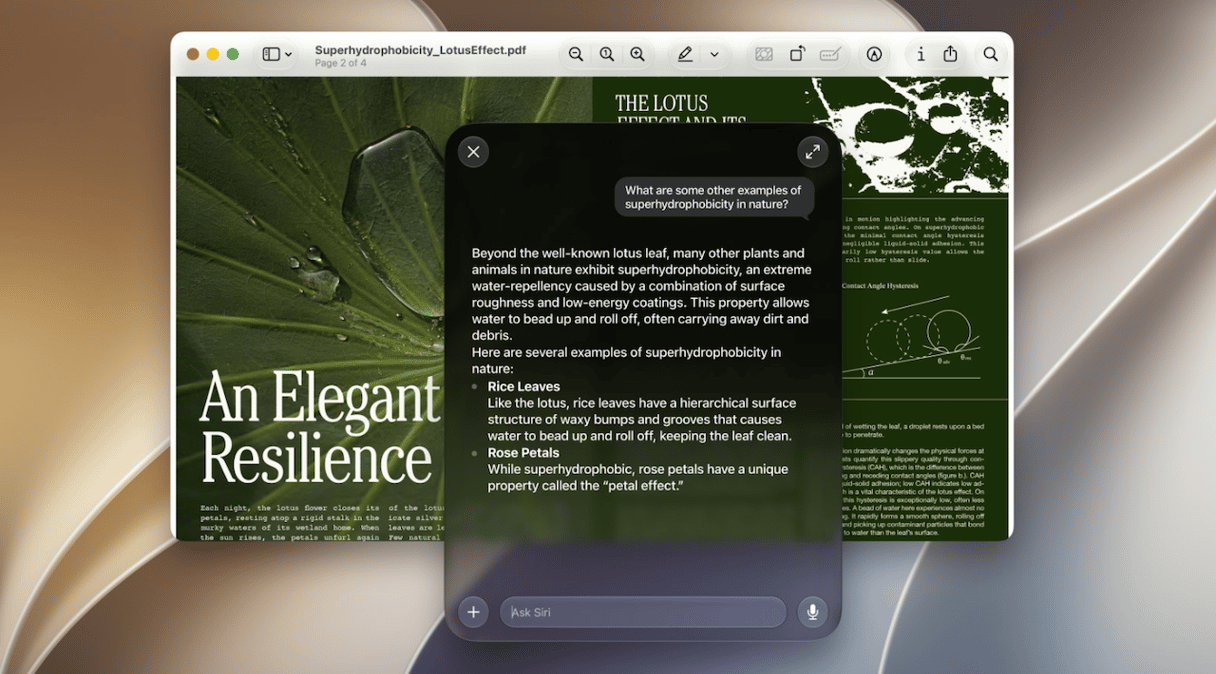
Write with Siri
You can use Write with Siri from any app in which you type to create, edit, or summarise text. Macs with an M3 chip or faster can customize the tone and expressiveness of Siri voice responses, and newer Macs also get improved dictation features.
Image Playground and Photos
Image Playground also gets an overhaul and can now generate photorealistic images, Genmoji have been improved, and their generation speeded up. All these extra features come with a price in terms of the demands they place on Apple’s servers, and so there will be daily limits on image generation, dependent on subscription to an iCloud+ plan.

New AI features in the Photos app include the ability to reframe an image to change its perspective, improved object removal, and the option to extend an image by adding more to the background of an image so you can crop it differently.
Liquid Glass
Apple’s Liquid Glass wasn’t universally popular when it launched with macOS Tahoe and iOS26. And it seems that Apple has listened to at least some of the criticism. There’s now a slider for changing the transparency of Liquid Glass elements, as well as a change to opacity that makes it easier to see complex content. Edges are darker and highlights brighter to improve depth and separation, and window shadows have been improved to make it easier to see which window is active.
Shortcuts
Shortcuts has long been a powerful but under-used app, largely because it’s complicated for most people to get to grips with. The new Shortcuts app understands natural language, so you can just tell it what you want your shortcut to do and it will create it for you.
Safari, AirDrop, and Passwords
In Golden Gate, Safari can automatically organize tabs, bookmarks, and Reading List items by topic, and it can monitor web pages and notify you when they change. Safari can also create extensions based on natural language prompts.

Better network performance means that Safari start pages load more quickly, AirDrop transfers are faster, and network file browsing is speedier.
The Passwords app has a new feature that allows you to change passwords it has identified as weak or compromised with a click.
Child Safety
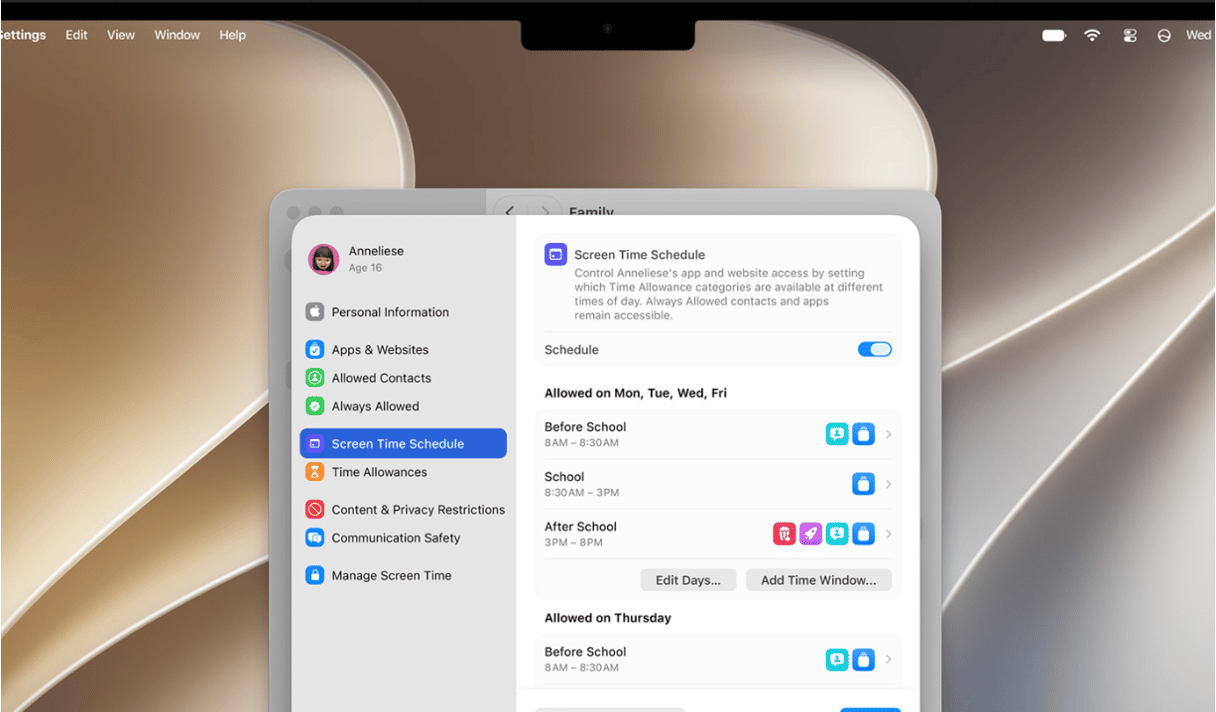
With all the focus on online safety for children around the world, it’s no surprise that Golden Gate has improved child safety features. These include an Ask to Browse feature that requires children to request permission from a parent or guardian via messages to browse a website. There’s also a Communication Safety feature that prevents children from seeing or sharing nudity in Apple apps, as well as intervening before children see gore or violence in an app. And parents can set time allowances and schedules for categories of activity like entertainment, games, and social media.
Everything else
Calendar gets natural language support so you can add or edit calendar entries with a text description. VoiceOver can now better understand onscreen content so it is able to provide richer descriptions. There’s a new captioning feature that automatically generates synced subtitles for any video you watch, and it can translate existing subtitles into other languages.
Pull to refresh, as you would do on iPhone, now works on Mac in Safari, Calendar, Mail and News. Maps gets enhanced flyovers, combining aerial imagery with Visual Intelligence models so that architecture and natural features like trees are rendered more clearly.
There are new features for iCloud Shared Albums, including making it easier for Windows or Android users to join and contribute to shared albums.
Better support for ultra-wide displays means that when your Mac is connected to one, you’ll be able to use higher resolutions, including 5K at 120Hz. And display arrangements now remain as they were when you disconnect and reconnect. Finally, support for Bootcamp, Apple File Protocol (AFP), and AirPort Time Capsule have all been removed.
Which Macs will Golden Gate support?
This is a much easier question to answer than usual. If your Mac has an Apple M-series chip, it will be supported to install Golden Gate. If it has an Intel chip, it won’t. That means the Macs listed below will be supported for Golden Gate.
- MacBook Air 2020 or later
- MacBook Pro 2020 or later
- MacBook Neo 2026
- Mac mini 2020 or later
- iMac 2021 or later
- Mac Studio 2022 or later
- Mac Pro 2023
Should you upgrade to Golden Gate?
If you have a Mac with Apple silicon and are running macOS Tahoe, then yes, definitely. If you’re running an earlier version of macOS because you don’t like Liquid Glass, then you may want to consider whether the interface improvements are enough to tempt you. If you have an Intel-based Mac, you will have to upgrade your hardware first. If you do decide to upgrade, be careful about upgrading a daily work Mac. It’s usually a good idea to wait for the final release before doing that.